แสดงบทความที่มีป้ายกำกับ ArcGIS Desktop แสดงบทความทั้งหมด

วันพฤหัสบดีที่ 24 เมษายน พ.ศ. 2557

แปลงไฟล์โปรเจ็คต์ของ ArcGIS (*.mxd) ให้เป็นโปรเจ็คต์ของ QGIS (*.qgs)

______ผมเคยลองนั่งคิดเล่นดูว่า ถ้าเราทำงานหรือวิเคราะห์อะไรบางอย่างไว้ที่ ArcGIS Desktop แต่อยากที่จะนำมาเปิดด้วยโปรแกรม QGIS โดยที่ไม่ต้องเสียเวลามา Add Layers ใหม่ทุกๆ ครั้ง เราจะทำอย่างไรดี เลยถามเพื่อนในกลุ่มก็เลยได้ Toolbox มาตัวนึง ซึ่งสร้างโดย Allan Maungu เราลองมาดุขั้นตอนกันดีกว่าครับ

1. Download Toolbox Click

2. ทำการแตกไฟล์ และก็ติดตั้ง PyXML-0.8.4.win32-py2.6.exe

3. เปิด ArcMap ขึ้นมา แล้วไปที่ Geoprocessing > ArcToolbox ให้คลิกขวา Add Toolbox

4. Browse ไปหา ArcToolbox ที่เราเก็บไว้ Z_ArcMap to Qgs.tbx

5. คลิกขวาที่ ArcMap to Quantum GIS > Properties...

6. ไปที่แถบเมนู Source แล้ว Browse เลือกไฟล์ mxd2qgs.py

7. จากนั้นเราก็เปิดโปรเจ็คต์ของ ArcMap ที่เราได้ทำการ Save ไว้ก่อนหน้านี้ขึ้นมา

8. เริ่มทำการแปลงไฟล์โปรเจ็คต์ ArcMap โดยทำการเลือกที่เก็บของโปรเจ็คต์ QGIS ดังภาพ

9. เมื่อคลิกปุ่ม OK แล้วเราก็จะได้ไฟล์โปรเจคต์ของ QGIS เพิ่มขึ้นมาดังภาพ

10. ผลลัพธ์ที่ได้ เสร็จแล้ว

11. ถ้าท่านไหนที่มีต่างแบบนี้ปรากฏขึ้นมาไม่ต้องตกใจครับ พอที่ผู้ที่เขียน Toolbox เค้าเขียนรองรับ ArcMap 10, Python 2.6.5 and Quantum GIS 1.6.0 แต่ถ้าท่านไหนที่ใช้ QGIS 2 ก็สามารถเปิดได้ครับ แต่ก็หน้าแบบนี้แสดงตลอด ถ้ารำคาญก็ให้ไปเปลี่ยน Code ที่บรรทัด 49  qgis.setAttribute("version", "1.6.0-Capiapo")เป็น qgis.setAttribute("version", "2.0.1-Dufour") ก็ได้แล้วครับ


ปล.แต่ถ้าท่านไหนใช้ python27 ก็ต้องหา lib PyXML-0.8.4.win32-py2.7.exe น่ะครับ

วันจันทร์ที่ 1 เมษายน พ.ศ. 2556

ดูค่าพิกัดของข้อมูล Shapefile ด้วย ogrinfo

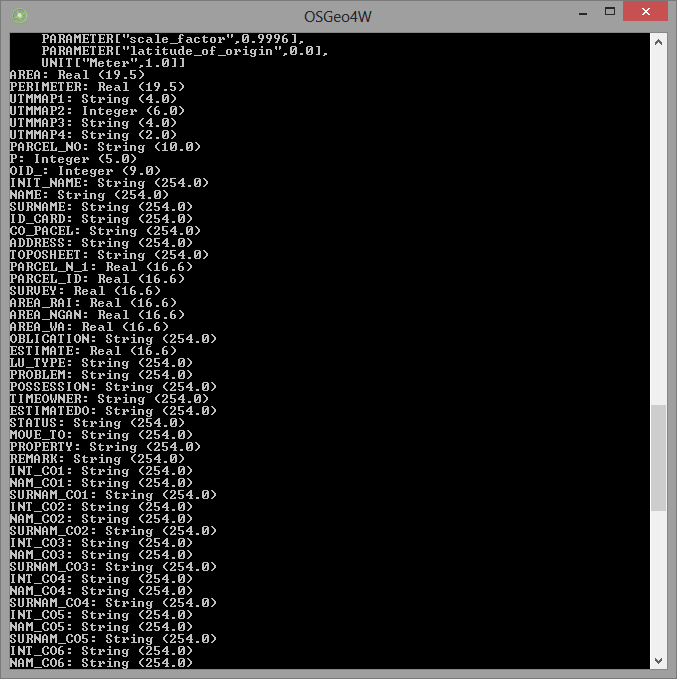
________หลายครั้งที่ผมเคยประสบปัญหาเกี่ยวกับ ค่าพิกัดหรือ projection ของข้อมูล shapefile ถ้าเกิดเราไม่ทราบว่าข้อมูลมันเป็นค่าพิกัดอะไร ซึ่งจะทำให้อาจเกิดความผิดพลาดไปกันใหญ่ เตลิดเปิดเปิงไปไกลเลยทีเดียว ยกตัวอย่างเช่น เรามีข้อมูล shapefile อยู่ชุดนึง แต่ดันไม่มีไฟล์ที่เป็นนามสกุล .prj ซะงั้น ซึ่งเมื่อมันอาจจะทำให้เราไม่ทราบค่าพิกัดข้อมูลชุดนั้น(หรือ shapefile ไม่ได้ define นั้นเอง)ซึ่งผมจะลองเปรียบเทียบ QGIS และ ArcGIS ให้ดูว่าถ้าข้อมูล shapefile ไม่มี .prj จะเป็นอย่างไรครับ แต่ ogrinfo ช่วยเราได้ครับ ซึ่งเราจำเป็นต้องติดตั้ง lib ของ GDAL/OGR ก่อนหรือไม่ก็ติดตั้ง FWTools ครับ ตั้งอย่างเช่น ogrinfo -al -so your.shp เพียงแค่นี้ก็ได้แล้วครับ

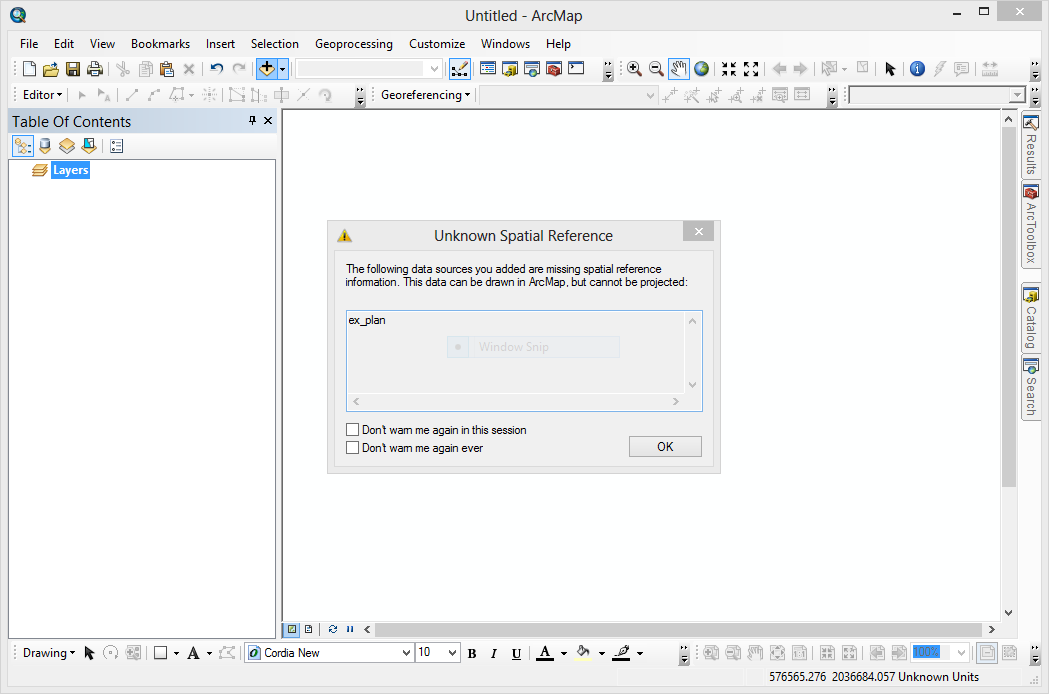
เปิดข้อมูล shapefile ใน arcgis

ไม่มีข้อมูลค่าพิกัดของ shapefile

ใน QGIS ก็จะเด้งถามเหมือนกันครับ

นี่แหละของจริงครับ ถามได้ บอกได้

บอกได้ถึงว่ามี Field อะไรบ้างด้วย แจ่ม
เอาไปลองดูกันเด้อครับ พี่น้องไทย...

วันพุธที่ 7 มีนาคม พ.ศ. 2555

ArcGIS 10 (Desktop, Engine, Server) Service Pack 4 - English

________มาแล้วครับ ArcGIS 10 Service Pack 4 หลังจากที่รอกันมาอยู่พักหนึ่ง ก็ได้ปล่อยออกมาวันที่ 5 มีนาคม 2555 เอาใจสำหรับคนใช้ arcgis กันหน่อยครับ เผื่อ service pack อาจจะแก้ bug บางตัวที่ยังติดปัญหากันอยู่ครับ ส่วนผมก็ยังคงใช้ Quantum GIS เหมือนเดิมแหละครับ :)
ArcGIS 10.0 Service Pack 4 Targeted Issues
Download ArcGIS 10 Service Pack 4 
Powered by esri

วันศุกร์ที่ 9 ธันวาคม พ.ศ. 2554

ArcGIS 10.1 Beta 2


The ArcGIS Beta Community team is proud to announce the ArcGIS 10.1 Beta program has kicked off to agreat start. We currently have approximately 2100 active Beta testers from around the world who are, as we speak, testing out some great new features:
______• ArcGIS for Server 10.1 is now native 64-bit! This allows you to leverage high performing CPUs and additional RAM
______• ArcGIS for Server 10.1 includes clustering! Allows users to scale, isolate and dedicate resources to individuals or groups of services. For example, you can dedicate your most powerful machine to your most used services. This will ensure that you have enough computing resources to keep up with demand.
______• ArcGIS 10.1 supports publishing services to the cloud
______• Spatial Data Server allows direct publishing of spatially enabled features (Oracle Spatial, PostGIS, SQL Spatial, and ArcSDE Geodatabases)
______• Improved Dynamic Rendering with ArcGIS for Server 10.1 allows you to change the symbology and add additional data to your map on the fly by sending a simple request
______• Dynamic Legends! Update legend contents based on the features in the visible extent
______• Editor Tracking! Track who makes edits and when edits occur in your feature classes
______• GeoProcessing and Locator Packages! Share your models, script tools and address locators
______• New methods for Administering Enterprise Geodatabases! Manage versions, connections and locks
If you want to get your hands on these cool features, come join us on the ArcGIS Beta Community. There are a ton of new features that make playing with beta software easy and fun.

Reference : Click to See

http://www.esri.com/software/arcgis/arcgis10/whats-coming/index.html